

Speed limits
This page covers how to set speed limits on segments in Switzerland: the entry rule, the general limits laid down in federal law, zones 30 and meeting zones, and the cases where the field stays empty.
General principle
The limit entered on a segment is the one that legally applies to the stretch of road.
- When a limit is posted, the sign prevails. Enter its value.
- With no sign, enter the general limit for that road type. It applies as a matter of law, without any signage being necessary.
Do not confuse it with actual driving speed
A speed limit is a regulatory value, not an observation. It cannot be inferred from the speed people drive at, nor from the traffic data the app reports.
The general limits in Switzerland
The ordinance on road traffic rules sets four general limits.
| Road type | General limit |
|---|---|
| Within localities | 50 km/h |
| Outside localities | 80 km/h |
| Expressways | 100 km/h |
| Motorways | 120 km/h |
The 50 km/h limit sometimes applies without a sign
The 50 km/h limit applies throughout the compactly built-up area. For anyone entering a locality on a minor secondary road (agricultural access road, forest track, a road that does not directly connect two localities), it applies even with no signage, as soon as there is a compactly built-up area.
This is the typical case where you enter 50 without having seen a sign on the imagery.
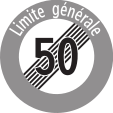
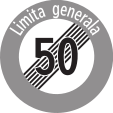
The switch to 80 km/h is read on the ground at the "End of maximum speed 50, General limit" sign, or when leaving an expressway or a motorway.
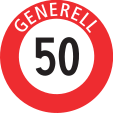
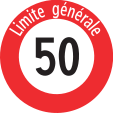
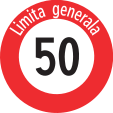
Swiss signs carrying text exist in German, French and Italian. The wording changes, the meaning does not.

Entering a speed in the WME
The Speed field sits in the side panel, which appears as soon as you select a segment. It accepts multiple selection: by picking several segments of the same stretch, you set the same value in one go.
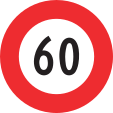
The value is in km/h. An ordinary speed limit sign, like this one, is entered as is.
For the other segment properties, see Segments.
Zones 30 and meeting zones
Two zone regimes bear directly on what you enter.
| Zone | Limit | Signal |
|---|---|---|
| Zone 30 | 30 km/h | 2.59.1 |
| Meeting zone | 20 km/h | 2.59.5 |
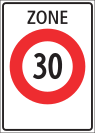
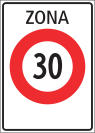
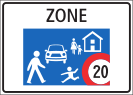
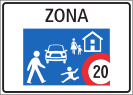
In a meeting zone, pedestrians may use the entire circulation area and have priority. These two signals are only allowed on secondary roads, not intended for general traffic: coming across one on a main axis should make you doubt your reading of the imagery.
The zone limit applies to every segment inside the perimeter, up to the end sign.
What you do not enter
- Roundabouts. A roundabout gets no speed limit. See Roundabouts.
- Advisory speeds. A recommendation sign is not a limit.
- Values observed in the field that match neither any signage nor any general limit.
When the signage changes
Speed limit changes are regularly reported on the Swiss forum, for example a change reported on the Schartenstrasse in Wettingen. Before updating a segment, verify the new signage, and favour a dated source: a municipal or cantonal order, an official publication, recent imagery.
Sources
- OCR (RS 741.11), art. 4a, general speed limits: https://www.fedlex.admin.ch/eli/cc/1962/1364_1409_1420/fr
- OSR (RS 741.21), art. 22a and 22b, zone 30 and meeting zone: https://www.fedlex.admin.ch/eli/cc/1979/1961_1961_1961/fr
- Signs: OSR signals, Federal Roads Office (ASTRA), public domain, via https://commons.wikimedia.org/wiki/Category:SVG_road_signs_in_Switzerland
- Swiss Forum (speed limit change cases): https://www.waze.com/discuss/c/editors/switzerland/4790